Quick Answer
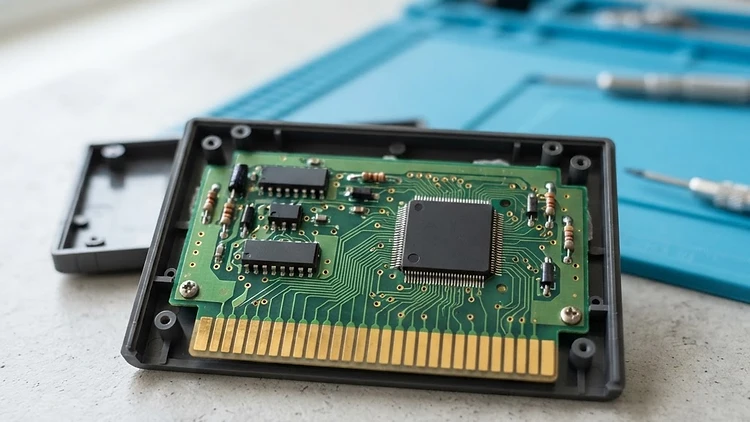
To maintain the longevity of your retro game cartridges, regular maintenance of the internal circuit board (PCB) is essential. The most critical area is the set of gold-plated contacts, which can accumulate oxidation and dirt over time, leading to poor connectivity. By using 90% or higher isopropyl alcohol and a soft, lint-free cloth or cotton swab, you can safely remove buildup without damaging the board. Always ensure the board is completely dry before reinserting it into your console, and avoid abrasive cleaning materials that could strip the delicate metallic plating.
Understanding the Internal Anatomy
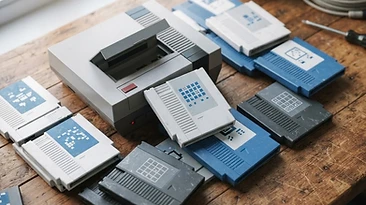
When you collect games from the NES or SNES era, you aren't just buying plastic shells; you are buying complex computing hardware. Inside every cartridge lies a printed circuit board (PCB). These boards house the ROM chips containing the game data, lockout chips, and sometimes additional hardware like battery-backed RAM for saving progress. Over the decades, these boards can become magnets for dust, humidity, and microscopic debris.
While many collectors focus on the aesthetic condition of labels and shells, the internal health of the PCB is what dictates whether a game boots instantly or requires a dozen tries. Understanding how to handle these boards is the first step in moving from a casual buyer to a true preservationist.
Signs Your Cartridge Needs Attention
Not every game needs to be opened, but certain symptoms suggest it is time for a deep clean:
- The game requires multiple insertions to boot.
- The system resets randomly during gameplay.
- Graphics flicker or display strange glitches (garbled text or sprites).
- The console freezes unexpectedly.
If you experience these, your cartridge likely has oxidized contacts. Think of oxidation as a thin layer of rust that forms on the metal pins, creating an insulating barrier that prevents the console from reading the data. Cleaning this layer is the most effective way to restore functionality.
Essential Tools for Safe Maintenance
Before you dive into your collection, make sure you have the right tools. Using improper household cleaners can be disastrous.
- Precision Bit Drivers: You will need specific security bits (often 3.8mm or 4.5mm) to open your cartridges. Avoid using makeshift tools, which can strip the screws.
- High-Concentration Isopropyl Alcohol: Only use 90% or higher. Low-percentage alcohol contains water, which can corrode your components.
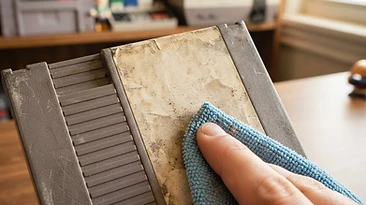
- Non-Abrasive Cleaning Material: Soft white erasers (carefully used) or high-quality microfiber cloths are best. Do not use paper towels or facial tissues, as they leave behind fibers.
- ESD-Safe Workspace: Static electricity is the enemy of microchips. Try to work on a non-conductive surface like a wooden desk.
The Cleaning Process: Step-by-Step
- Prepare the Space: Ensure your hands are clean and the area is clear of liquids.
- Open the Cartridge: Use the correct bit to remove the screws and carefully separate the plastic shell.
- Inspect the Board: Look for signs of corrosion (greenish or blue crust) or broken solder joints. If you see deep corrosion, the board may need professional repair.
- Clean the Contacts: Dip your cotton swab in isopropyl alcohol. Gently scrub the gold contacts on both sides. You will often see dark residue come off on the swab. Repeat until the swab comes away clean.
- Let it Dry: Wait at least 10-15 minutes for the alcohol to evaporate completely.
- Reassemble: Put the board back into the shell and tighten the screws firmly but do not overtighten, as the plastic pillars can be fragile.
Why We Prioritize Maintenance at OldStyleGamings
At OldStyleGamings, we believe that every game deserves a second life. When you browse our Catalog, you can rest easy knowing that our team understands the internal mechanics of these systems. We handle our inventory with the same care a collector uses for their own personal shelves. Whether you are hunting for an elusive Nintendo64 title or a complete NintendoDS classic, we ensure that the items you receive are vetted for performance. If you ever have a concern, our Returns policy is designed to give you total peace of mind.
Frequently Asked Questions
Can I use a pencil eraser to clean the pins?
A: While many collectors use a white eraser to remove oxidation, we advise caution. Erasers can leave behind abrasive rubber crumbs that can get stuck in your console slot. If you use this method, ensure you use a clean brush to clear away every last bit of debris afterward.
Should I use WD-40 on my cartridge pins?
A: Never. WD-40 is an oil-based lubricant and will leave a sticky residue that attracts dust and grime, eventually ruining your game and potentially damaging the console’s cartridge slot pins.
How often should I perform this maintenance?
A: You do not need to clean your games frequently. In fact, over-cleaning can cause unnecessary wear. Perform a deep clean only when a game begins to show signs of failure or if you have just acquired a new, untested copy from an unknown source.
Is it safe to leave games in their original boxes?
A: Yes, but ensure your storage environment is cool and dry. High humidity is the primary cause of oxidation on circuit boards. Silica gel packets inside your storage bins can help manage moisture levels.
Explore our Bundles to start your collection the right way, or browse our full range of Consoles to pair with your newly maintained library. Shop OldStyleGamings today and keep the spirit of retro gaming alive!